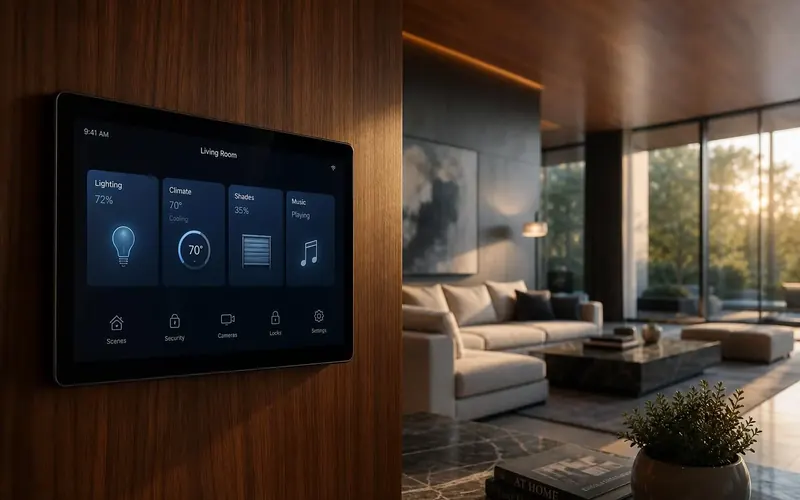
From lighting and shades to climate and entertainment — here's how a true home automation system fits together.
When most homeowners hear the phrase "smart home," they picture a single voice assistant on a kitchen counter. A real home automation system is something different: a coordinated platform that quietly ties together the things you use every day — lighting, shades, climate, audio, video, security, and networking — so they behave like one product instead of a dozen apps.
The goal isn't to add screens to your walls. It's to remove friction. Done well, automation disappears into the background of daily life: the right lights at the right brightness, the right temperature in the right room, the right audio in the right zone, all without anyone reaching for a phone.
The four layers of a real automation system
Every well-designed system is built in layers. Skip a layer and the experience falls apart — usually right after the installer leaves.
1. Network. Enterprise-grade WiFi and structured wiring. Every smart device is only as reliable as the network it sits on. 2. Devices. Lighting keypads, shades, thermostats, locks, cameras, speakers, displays. 3. Control. A single platform (Control4, Lutron, Savant, or similar) that speaks to every device. 4. Programming. Scenes, schedules, and automations tuned to how your household actually lives.
Lighting and shades are where it starts
If you only automate one thing, automate lighting. Replacing wall switches with keypads means a single "Evening" button can dim the kitchen, turn the under-cabinets to 40%, raise the dining pendants, and close the front shades — all in one tap.
Motorized shades extend the same idea. Set them to track the sun in the summer to keep your home cool, or to wake you gently in the morning instead of an alarm. Once you've lived with quiet, well-tuned shades, blind cords feel like a relic.
Climate, audio, and video tie it together
Smart thermostats become genuinely useful when they're tied to occupancy and schedules — not just a phone app. Whole-home audio means music follows you from room to room without juggling Bluetooth. Video distribution lets a single Apple TV feed every screen in the house, so you stop hunting for remotes.
The thread connecting all of it is the control system. That's what turns a pile of devices into a home that responds to you.
Where homeowners get it wrong
The most common mistake is buying devices first and thinking about the system later. The second is underspending on the network. The third is assuming the installer will guess how you live — without anyone ever asking.
A good integrator starts with conversations, not catalogs: How does your morning go? What rooms do you actually use? What annoys you about your current house? The system gets designed around the answers.
A day in an automated home
It's easier to picture automation through an ordinary day. At 6:30 the bedroom shades open part way and the hallway lights come up to a soft 30%. The thermostat has already warmed the kitchen, because the system knows that's where the morning starts.
When the last person leaves, one "Away" button on the keypad by the garage door turns off every light, lowers the thermostat, locks the doors and arms the cameras. If someone forgets, a schedule or a phone notification takes care of it.
In the evening, a "Dinner" scene dims the kitchen, lights the dining table and starts a quiet playlist on the patio speakers. Later, "Movie" lowers the living room shades, dims the lights and turns on the TV and sound system with one press. At bedtime, "Goodnight" checks the locks, turns off everything downstairs and leaves a low path light on to the kitchen.
None of this needs anyone to open an app. That's the difference between a house full of smart gadgets and a home that's actually automated.
Smart gadgets vs. a whole-home system
Plug-in smart bulbs, a voice speaker and a video doorbell are a fine start. The trouble shows up as the collection grows: each device has its own app, its own account and its own update schedule, and none of them really talk to each other.
A whole-home system puts one control platform in charge. Lighting, shades, climate, audio, video and security all appear in one app and on the same keypads, and they can trigger each other. Locking the front door can turn off the lights; a motion sensor on the driveway can turn on the porch light and show the camera on the TV.
Whole-home systems also last longer. They're designed to be serviced, expanded and updated, rather than replaced every few years when a gadget stops being supported.
Planning a project: new builds, remodels and existing homes
New construction gives the most freedom. During the pre-wire stage, after framing and before drywall, we run network, speaker and control wiring to exactly where it's needed. It costs far less than adding it later, and it keeps every option open.
Remodels are the next best moment. When walls or ceilings are already open, it's easy to add speaker wire, keypad locations or a cable to a new TV spot.
Existing homes can still be automated well. Many lighting, shade and lock products work wirelessly or with the wiring already in the walls, and attics and crawl spaces often give us a path for the cables that are needed. The planning conversation is the same; we just choose products that suit the house.
Questions to ask before you hire an integrator
Who programs the system, and can it be changed later? You'll want someone who will adjust scenes after you've lived with them for a few weeks.
What happens if the internet goes down? A good system keeps local control working, so lights and keypads still respond.
How is the network designed? If the answer is "we'll use your current router," ask more questions. The network is the foundation for everything else.
Who do I call when something goes wrong? Local support matters. A system that's easy to service is worth more than one with the longest feature list.
Can the system grow? Make sure the first phase is designed so you can add rooms, shades, audio or security later without starting over.
What to expect from us
At Brand43 Technologies, every project starts with a free on-site consultation. We walk the home with you, learn how you live, and design a system that scales — whether you're starting with lighting in one room or wiring a new build from the studs.
If you're in Bluffton, Hilton Head, or anywhere in the Lowcountry and you're starting to ask these questions, we'd love to help you answer them.